The undara connector
undara in Claude
Expert skills for Claude: guided missions that take your work to a professional result — decks, websites, spreadsheet apps — with your About me and your projects in every chat, on the web, the desktop app and your phone. Nothing to download.
Add undara to Claude
Just you
- In Claude (claude.ai or the desktop app) open Plugins (or Customize → Connectors).
- Click Add → Add custom connector, name it undara and paste the URL
https://undara.ai/mcp. - Click Continue, then Connect when Claude asks; sign in to undara.ai and click Allow.
What it looks like in Claude
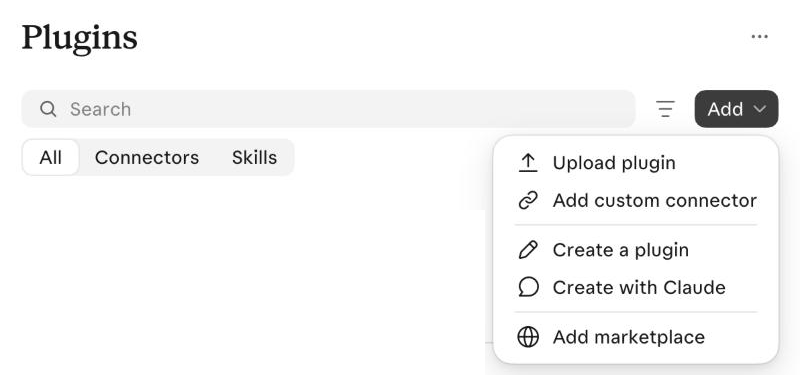
1. In Claude's sidebar open Plugins, then Add → Add custom connector. 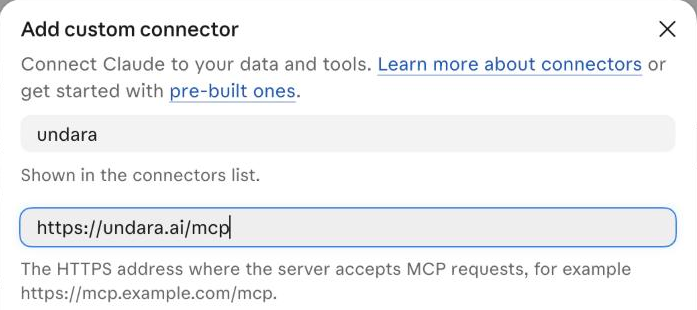
2. Name: undara. MCP server URL: https://undara.ai/mcp. 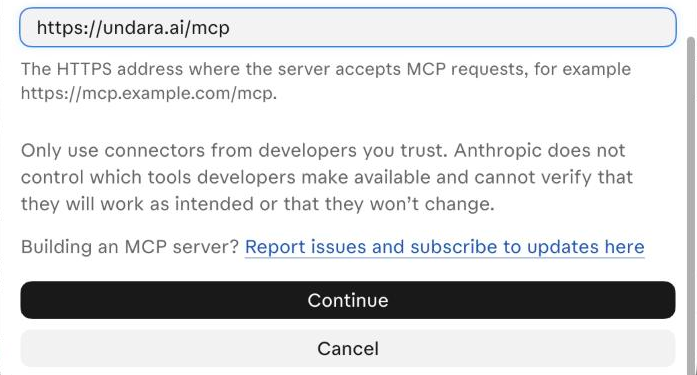
3. Click Continue. Claude checks undara's server and adds it. 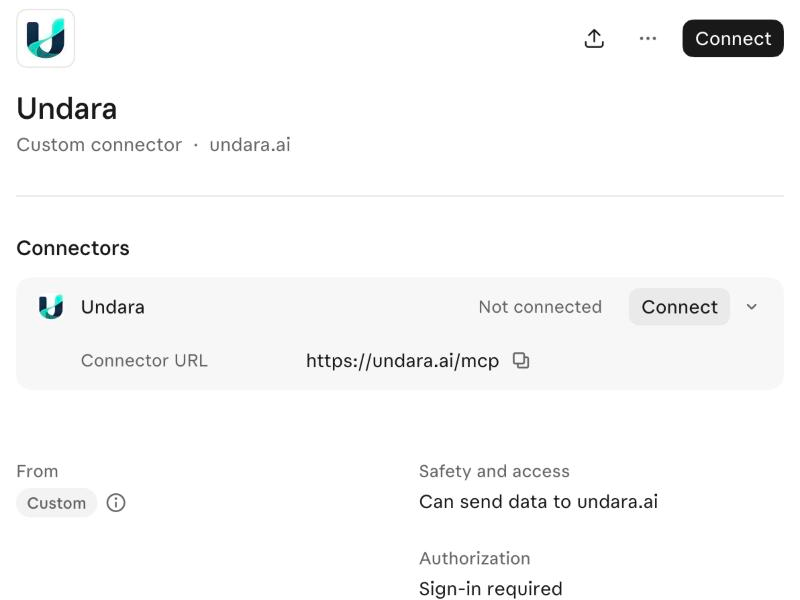
4. On undara's page in Claude, click Connect. 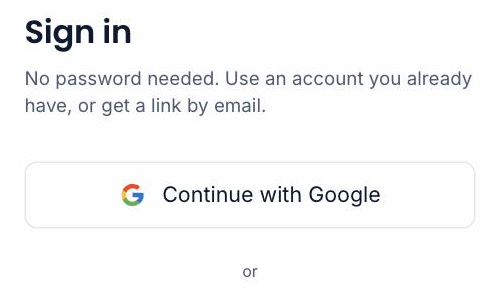
5. undara.ai opens: sign in (Google, GitHub or a link by email), then click Allow.
For a company (Claude Team or Enterprise)
An owner adds undara once in Organization settings → Connectors; then each person clicks Connect and signs in with their own undara account.
Add undara to ChatGPT
- On chatgpt.com open Plugins (chatgpt.com/plugins), click + and choose Add custom MCP server.
- Name it undara, paste the URL
https://undara.ai/mcpand choose OAuth for authentication. - Read the notice, tick I understand and want to continue and click Create; then connect, sign in to undara.ai and click Allow.
Custom MCP servers depend on your ChatGPT plan and your workspace's settings — on company plans an admin may need to allow or add them. See OpenAI's help. ChatGPT's menus change often; if a step looks different, look for “custom MCP server” or “connector”.
Add undara to Microsoft Copilot (companies)
Copilot Studio: in your agent open Tools → Add a tool → New tool → Model Context Protocol, Server URL https://undara.ai/mcp, authentication OAuth 2.0 → Dynamic discovery, then Create a new connection → Add to agent.
Microsoft 365 Copilot: build an agent with Microsoft 365 Agents Toolkit, add an MCP plugin with the same URL and choose dynamic client registration.
If your setup asks for a client ID and secret, your undara for Teams admin creates them on the Company page (Microsoft Copilot). Everyone signs in once with their own undara account. Approvals of credits open on undara.ai.
New to undara? Get the free starter pack — your first skill and 250 credits. Already using AI? Get the pro pack: 14 days of Plus, free.
Talk to undara in any chat
undara: start— your skills, credits and the next step on your checklist.undara: <skill> → <step>— run a step; copy it from your mission page on undara.ai.undara: My projects— everything you made with undara; continue any of it.undara: About me— see and improve what undara knows about you.undara: inbox· “send this to Ana” — handoffs with colleagues (undara for Teams).- “undara, develop a new skill on this process and deliverable” — turn a chat that worked into your own skill.
Credits: nothing without your yes
Images, pro diagrams and icons that undara makes cost credits. In Claude, undara's card appears in the chat with the cost, what you get and the risk: you click Approve or Decline — Claude can't approve for you. In ChatGPT or Microsoft Copilot, or past the day's limit for approvals in the chat, you approve on undara.ai with the link your AI gives you (it's also there in Claude, in case the card doesn't show). If something fails the credits come back, and if undara gets something wrong the fix is free.
Your data
- Connecting keeps your work in your undara account: your answers to mission steps, your About me, the files Claude saves and messages to colleagues — so they're there in every chat and on every device. Free up to 250 MB.
- We never sell it, never share it for others' purposes and never use it for other customers or to train AI models. Details in the Privacy Policy.
- Disconnect: Claude → Plugins (or Customize → Connectors) → undara → ⋯ → Remove (in ChatGPT: Plugins → undara → remove). Delete your data: My projects → Delete my copy, or write to hello@undara.ai to close your account.
Help
Write to hello@undara.ai. Terms · Privacy · Impressum